
399ドルのマルチカラープリンター – Flashforge AD5X – マルチカラーテスト
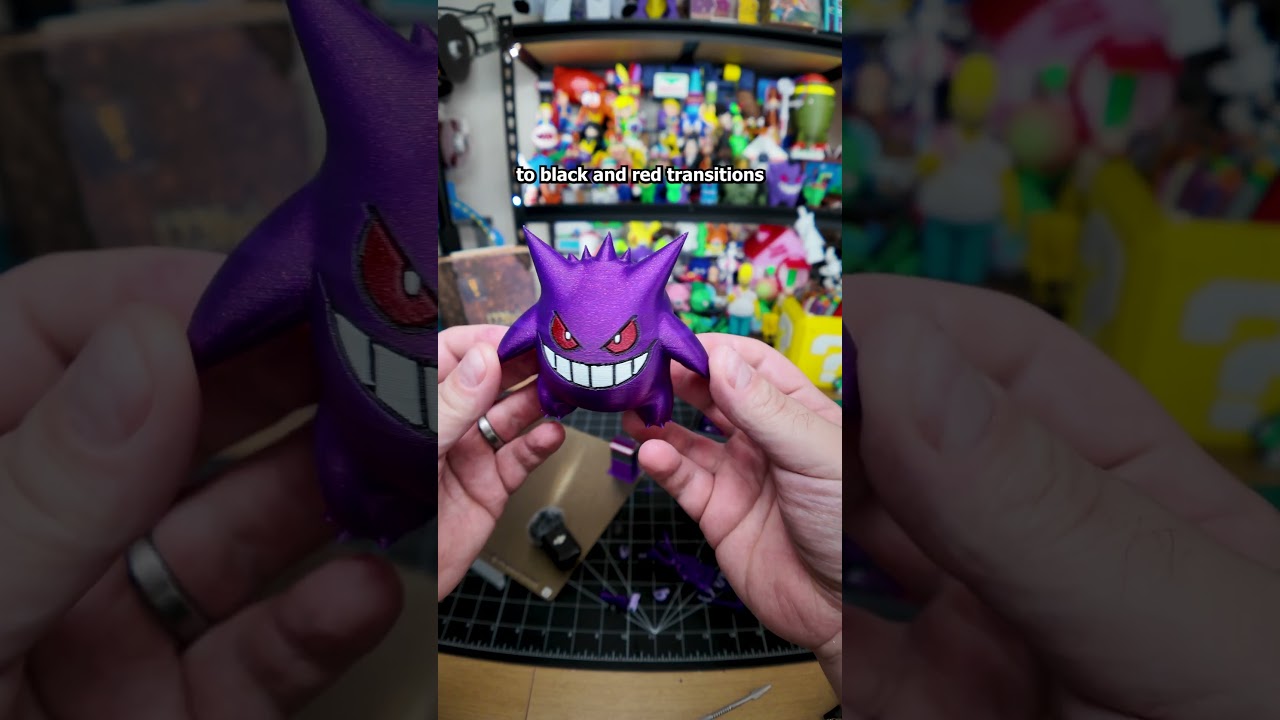
85X test printing continues. So, Flash for sent me their new 85X to review. I already shared my initial impressions, but this time I want to focus on the prints themselves. To test the multiolor capabilities, I printed a Gengar using both Aurora line filaments they sent me. I left everything on default settings to see how it performs out the box, and honestly, it did really well. Supports came off really easily. Scarring was minimal, and with a few tweaks, it could look even better. There was some expected stringing at the top, but a quick torch pass cleaned it up completely. Flushing volumes definitely need adjusting. You can see white bleeding into the purple around the mouth and eyes. Purple to black and red transitions, though, could actually use less flashing and still look clean. That means with the right setup, you can cut down on waste, print time, and improve quality. One small artifact appeared at the start of the mouth. At first, I thought it was overextrusion, but since it never showed up again, it was probably just a slice of glitch. Overall, for a default multiolor print, this Gengar came out great. And with some tuning, it can only get better.
Find out more about the AD5X here – https://geni.us/AD5XBIO
I will keep testing and posting all my findings with the printer. Drop your questions and suggestions in the comments.
Thank you @flashforge3d for sending me the printer. They did supply the printer to me free of charge in exchange for an honest review and opinion. I was given full creative freedom and all opinions are my own.
How much does it cost? And what is the software like
FlashForge is running a promotion this month. You can trade in any old printer to receive a $100 coupon towards the AD5X As well as additional $30 OFF using the code HIDEAL.
3D Printers of any brand and any condition are acceptable.
Simply fill out the trade in form and follow the instructions
https://geni.us/FLASHFORGETRADEIN
W
Ive seen online that there's a bug with flushing volumes, meaning if you're doing changes in the slicer it doesn't really change anything and basically making flushing volumes a fixed rate. Do you know if that has been fixed?
Link to the purple filament please 🥺
Can you make shoes with it